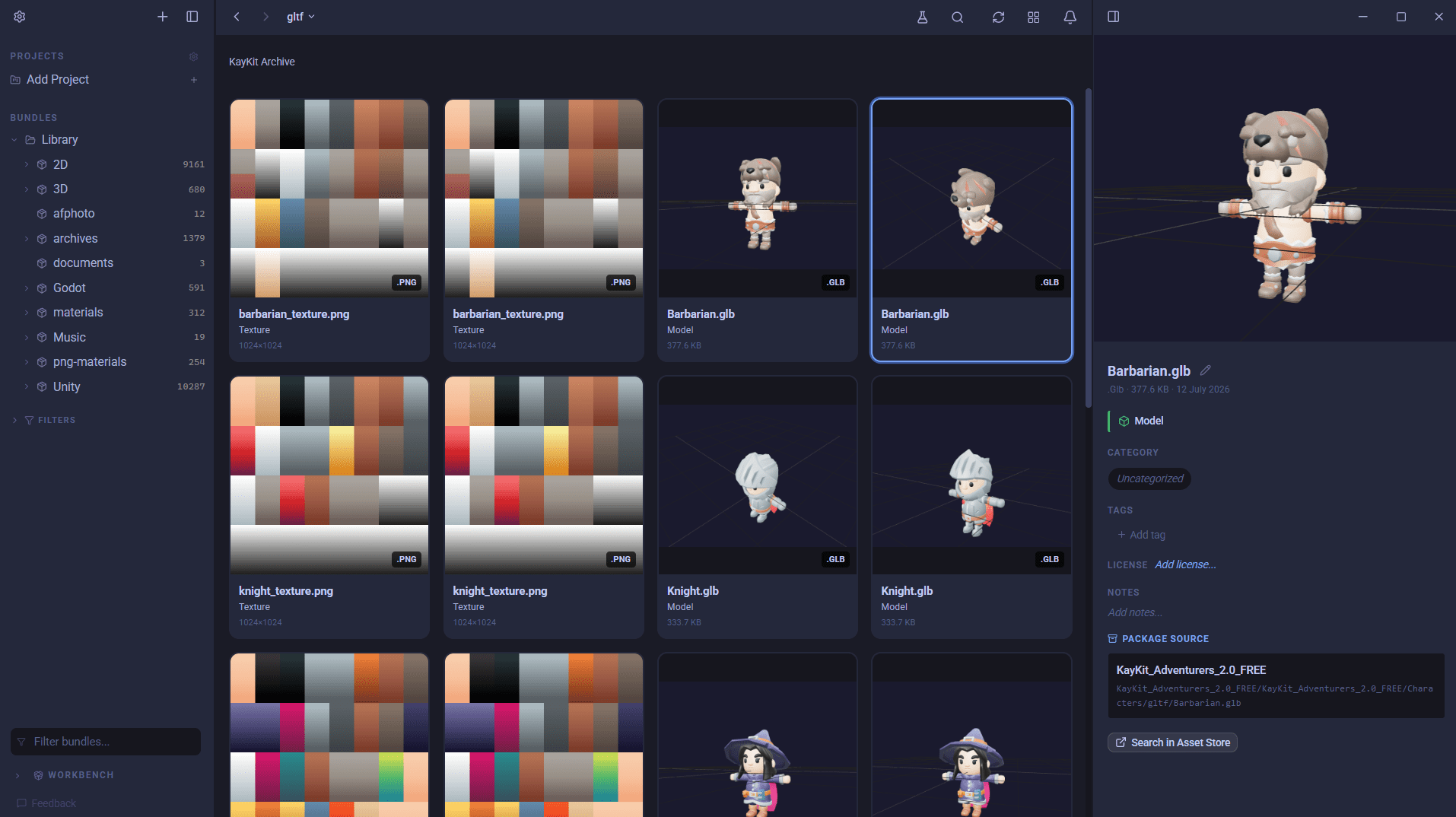
Every game developer has the same graveyard: a folder full of .zip, .unitypackage, and .tar.gz files you downloaded from a bundle sale two years ago. You know there is a great rock texture in one of them. You have no idea which. So you unzip all forty of them onto your SSD, poke around, and then have two copies of everything forever.
AssetHoard is a local-first asset manager for indie game developers and digital artists, and it takes a different approach to archives. It reads them where they sit, builds a searchable index of what is inside, and shows you previews of the contents, all without extracting a single file. The feature announcement covered what that looks like day to day; this post is how it works under the hood, and why it is faster than it has any right to be.
Nothing gets extracted: indexing archives in place
There was a single goal, and no obvious way to reach it: the original archive is referenced in place and never copied. When AssetHoard imports a .zip or .unitypackage, it does not unpack it into a working directory. It opens the file, walks its table of contents, and records every member (each model, texture, and audio clip inside) as a logical entry in your library. The archive on disk is left exactly as it was.
That means importing a 4 GB asset pack costs you close to zero extra disk space. Your library shows the contents, your searches and filters cover the contents, but the bytes stay compressed inside the one file you already have.
Supported archive formats today:
- Unity packages (
.unitypackage), with a dedicated indexer that understands Unity's GUID-and-pathname layout - Zip (
.zip) - Tarballs:
.tar,.tar.gz,.tgz, and bare.gz - RAR (
.rar)
Each format gets its own adapter behind a shared contract, so the rest of the app never has to care whether a preview came out of a zip central directory or a gzip stream.
Reaching one file in the middle of a compressed stream
Listing an archive's contents is straightforward. The awkward bit is pulling one file out of the middle of a compressed stream when you want to preview it, without decompressing everything before it.
For a zip this is tractable: zip keeps a central directory and each entry is independently compressed, so AssetHoard can seek straight to the member it wants. A tarball is a single walk. But a .tar.gz is one long gzip stream with no seek points at all. Naively, to read the last file you would have to decompress the entire archive first.
AssetHoard solves this with a checkpoint index (the "zran" technique). During indexing it drops an access point roughly every 1 MB of decompressed data and writes those checkpoints into a small sidecar file next to the index. When you later ask to preview a member, it jumps to the nearest checkpoint and decompresses forwards only from there. The sidecar costs about 1.6% of the archive size, and in exchange a file buried deep in a gzip stream opens in a fraction of a second instead of after a full-archive decompress.
When a member does get read, it is streamed, never buffered. A single mesh inside a package can be hundreds of megabytes, so AssetHoard opens a reader over the member's uncompressed bytes and pipes them straight to a cache file on disk. It never holds a whole member in memory.
Previewing files inside an archive
Browsing a package should feel like browsing a folder. In AssetHoard it does, and the trick is doing the least possible work per item.
- Images and textures get thumbnailed and shown in the grid.
- 3D models show a poster-frame thumbnail by default. The full interactive viewer only mounts, and only plucks the model's bytes out of the archive, when you actually click "View in 3D". You can scroll past a hundred models without decompressing a single one.
- Audio clips play in place.
- Engine resources are understood natively. Godot packages, for example, surface their embedded
preview.pnginstead of falling back to a generic icon.
There is a nice bit of restraint in the indexer here too. For a "solid" archive, where every read has to re-decompress from a block boundary, an eager pass that thumbnailed every member up front would be quadratic. AssetHoard detects that case and skips the eager pass, falling back to generating previews lazily on first view. You get thumbnails either way; the app just refuses to melt your CPU to get them a few seconds sooner.
Thumbnails, once generated, are cached as PNGs and served to the interface over a local asset protocol. Image bytes never cross the boundary between the Rust core and the UI, which keeps browsing snappy even in packages with thousands of members.
Keeping the index correct when the archive changes
Referencing files in place instead of copying them raises an obvious question: what happens when the archive changes, or the index and the file drift apart? AssetHoard treats this as a first-class concern.
- Fingerprinting and a freshness ladder. Cached previews are stamped with a fingerprint of their source archive. If the cache file is present, it is provably current, so it is served without even touching the database or reopening the archive. If the archive changed underneath, the index is rebuilt.
- Drift detection. Before yielding bytes from a seek into a tarball, the adapter re-checks the 512-byte tar header at the recorded offset against the member it expected. If they do not match, it drops the stale cache, rebuilds the index once, and retries. A corrupted or silently-shifted index can never hand you the wrong file's bytes.
- Per-archive locks. Two previews of the same archive will not both pay for an expensive rebuild. The costly index build serialises on a per-archive lock while everything else stays concurrent.
- A security gate. Virtual member pointers only resolve to archives AssetHoard actually imported. You cannot smuggle an arbitrary path off disk through a crafted pointer.
- Graceful degradation. If the source archive is moved or deleted, that is an expected outcome (the original was never copied), and the app says so rather than crashing. Password-protected archives are refused cleanly at index time instead of half-importing members that could never preview.
Why it matters
Put together, this means you can point AssetHoard at a directory of untouched archives and immediately treat their contents as first-class library items: searchable, filterable, taggable, and previewable, with no extraction step, no duplicated storage, and no waiting for a 4 GB unzip to finish before you can find your rock texture.
The archives stay exactly as you downloaded them. AssetHoard just gives you x-ray vision into them.
Have a browse through the archives documentation for the full picture, or download AssetHoard and point it at that graveyard folder you have been avoiding.
Mark
Frequently asked questions
During indexing it builds a checkpoint index (the zran technique), dropping an access point roughly every 1 MB of decompressed data into a small sidecar file. To preview a file it jumps to the nearest checkpoint and decompresses forward only from there, so a file buried deep in the stream opens in a fraction of a second instead of after a full-archive decompress.
Very little. The archive is referenced in place and never copied, so importing a 4 GB pack costs close to zero extra space. The gzip checkpoint sidecar adds about 1.6% of the archive size, and files are streamed straight to a cache rather than buffered, so a single mesh of hundreds of megabytes never loads into memory in full.
Cached previews are fingerprinted against their source archive, so a changed archive triggers a one-time rebuild of the index, and a stale tar offset is caught by re-checking the file header before any bytes are served. If the archive is moved or deleted, AssetHoard tells you rather than crashing, because the original was never copied in the first place.
Yes. Unitypackage files have a dedicated indexer that understands Unity's GUID-and-pathname layout, alongside zip, RAR, and tar archives (.tar, .tar.gz, .tgz and bare .gz). The contents are indexed and previewed in place, with nothing extracted to disk.
No. Password-protected archives are refused cleanly when you import them, rather than half-importing members that could never be previewed.