Eagle vs AssetHoard an Eagle alternative built for game assets
Eagle is an excellent visual organiser for designers and illustrators. AssetHoard is built for the files game developers actually keep: 3D models, Aseprite sprites, PBR materials, .unitypackage files and engine resources. Here’s how they compare, honestly.
The short answer
Pick Eagle if you’re mainly a graphic designer or illustrator, your library is design files and photos, and you save a lot of references from the web.
Pick AssetHoard if you’re a game developer or game artist and your library is full of Aseprite sprites, materials, animated models and engine files that Eagle can’t properly preview. It’s also the one to pick if you work on Linux.
Feature comparison
How Eagle and AssetHoard handle the files in a typical game development library.
| Eagle | AssetHoard | |
|---|---|---|
| Built for | Designers, illustrators and reference collecting | Game developers and game artists |
| 3D model preview | Not supported | FBX, OBJ, STL, glTF/GLB, .blend and .dae in the built-in viewer |
| 3D animation playback | No | Yes, in the viewer |
| Aseprite files | Not supported | Previewed, with frame-by-frame animation |
| Pixel art | Smoothed, so sprites look blurry | Detected automatically and rendered pixel-perfect |
| PBR texture sets | Separate, unrelated files | Grouped automatically |
| Material files (.mat, .mtl, .mtlx, .sbsar) | Not recognised | Rendered on a lit 3D sphere |
| Unity .unitypackage | Not supported | Browse contents without importing into Unity |
| Godot .tres, .tscn and .res | Not supported | Supported |
| Browser extension for saving web references | Yes, with source URL | No |
| Design source files | Photoshop, Affinity, Illustrator, InDesign and PDF | Photoshop, Affinity and PDF (with layers). No Illustrator or InDesign |
| Platforms | Windows and macOS | Windows, macOS and Linux |
Eagle details checked against Eagle’s support documentation in October 2026. Eagle is updated occasionally, so if something here is out of date, let us know and we’ll fix it.
What Eagle does well
Eagle earns its loyal following. The interface is clean and browsing large image and video collections is fast. Tags can be colour-coded, nested into groups and filtered in ways that make sense for visual work.
Its browser extension is a standout. Saving an image from the web straight into your library, with the source URL attached, is genuinely useful for mood boards. AssetHoard has nothing equivalent.
Eagle also previews design source files from Photoshop, Illustrator, Affinity and InDesign, along with RAW photos and video. If you’re gathering references early in a project, it does that job well.
Where game developers outgrow Eagle
Eagle was designed for a different kind of library. These are the gaps game developers run into, and how AssetHoard handles each one.
Aseprite and pixel art
Eagle doesn’t render .aseprite files, and it smooths pixel art, so sprites turn into soft, blurry thumbnails. AssetHoard plays Aseprite animations and renders pixel art crisply at any zoom.
Key features
- Previews .aseprite files with frame-by-frame playback
- Pixel art detected automatically at import
- Override the renderer per asset, bundle or category

3D models and animation

Eagle doesn’t play 3D animations, and by its own documentation, FBX and OBJ models don’t show their textures until you relink them in another 3D app. AssetHoard previews your models and plays their animations in one library.
Key features
- glTF/GLB, .blend, .fbx, .dae, .obj and .stl in one library
- Rotate, zoom and play animations in the app
- Check a walk cycle without opening Blender
PBR textures and materials
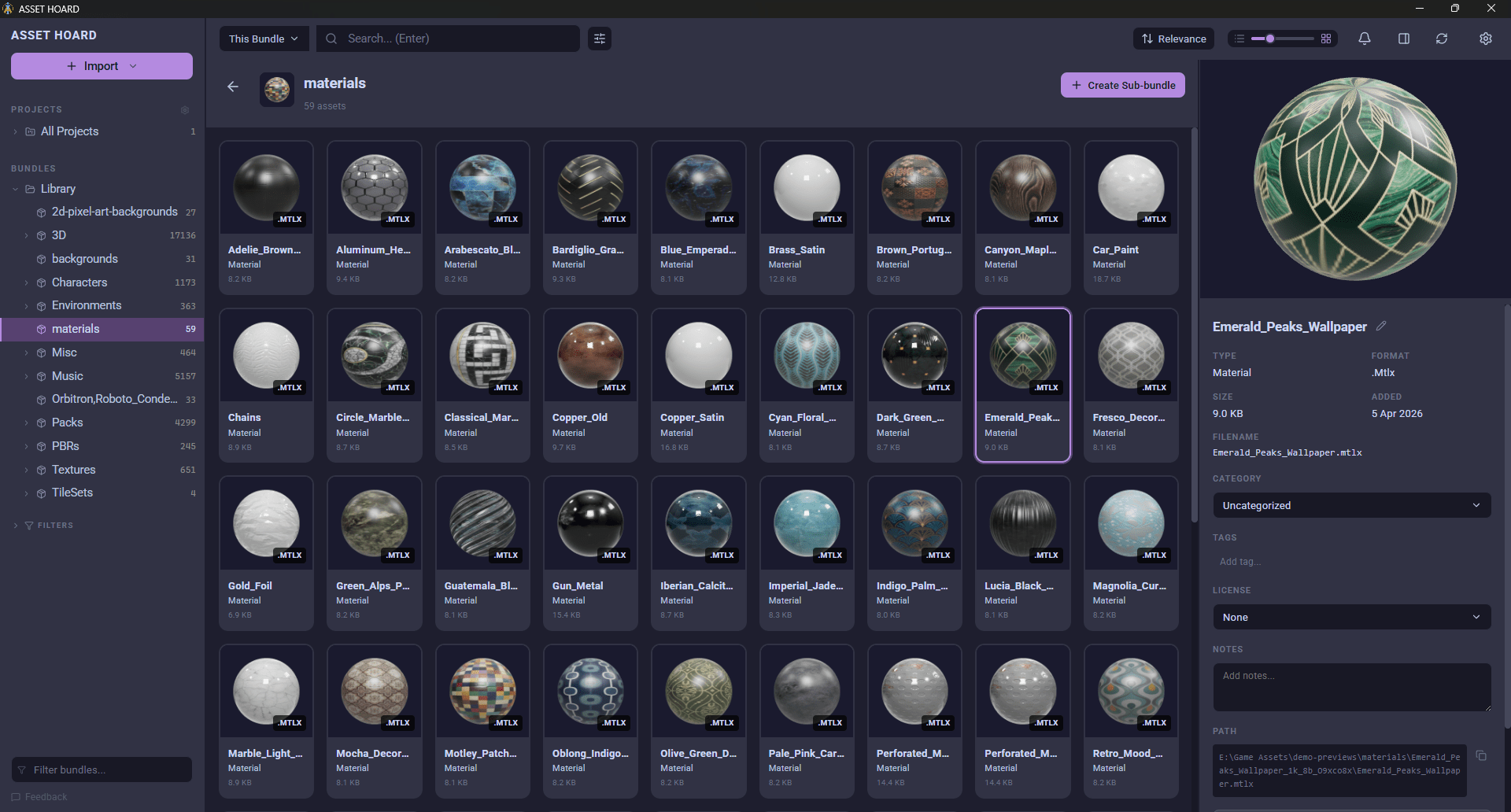
In Eagle, a PBR material is five unrelated image files and its material file is an opaque icon. AssetHoard groups the set and shows you the actual surface, so you’re looking at materials, not maps.
Key features
- Albedo, normal, roughness and other maps grouped automatically
- Materials rendered on a lit 3D sphere
- Supports .mat, .mtl, .mtlx, .sbsar and .sbs
Unity packages and engine files
Eagle can’t look inside a .unitypackage or make sense of Godot resources. AssetHoard reads them directly, so you can see what you own without opening an engine. See also the Godot, Unreal and GameMaker pages.
Key features
- Browse .unitypackage contents without importing
- Godot .tres, .tscn and .res files
- Drag assets straight into Unity or Godot

Honest trade-offs
AssetHoard isn’t better at everything.
- Eagle’s browser extension for collecting web references has no equivalent in AssetHoard.
- Eagle previews Illustrator and InDesign files, which AssetHoard doesn’t. That matters if your work leans towards graphic design.
- On platforms it’s the other way round: Eagle is Windows and macOS only, while AssetHoard also runs on Linux.
Plenty of people use both: Eagle for mood boards and inspiration, AssetHoard for the assets that end up in the game. A simple test is to look at your library and count game-specific files against general design files. That ratio tells you which tool would be doing more of the work.
See your whole game asset library
Local-first. No subscription. Free during the beta.
Frequently asked questions
Yes, if most of your library is game assets. AssetHoard previews formats Eagle doesn’t, including .unitypackage files, Godot resources, Aseprite animations and material files, plays 3D animations, and it renders pixel art without smoothing. If your library is mostly design files and web references, Eagle is likely the better fit.
No. Eagle shows .aseprite files as an unsupported-format placeholder. AssetHoard previews them and plays back their animations frame by frame.
No. Eagle can’t look inside a .unitypackage, so you have to import it into Unity to see what it contains. AssetHoard lets you browse the contents of a .unitypackage without opening Unity.
No. Eagle is available for Windows and macOS only. AssetHoard runs on Windows, macOS and Linux.
Yes. They cover different ground. Plenty of people use Eagle for mood boards and saving references from the web, and AssetHoard for the game assets that go into their projects.
AssetHoard is free to download and use during the open beta. From full release it’s a one-time purchase with no subscription: $29 USD if you buy during the beta, $49 at release. A licence covers every update within the major version you buy, and licences bought during the beta cover all of 1.x.
No. AssetHoard is local-first. Your library lives on your machine, with no cloud sync and no account required.