An asset manager for 3D artists and game devs
Rotate and zoom FBX, glTF, and OBJ models directly in your library. Browse your 3D assets visually, instead of opening Blender for every file, and keep every prop, character, and environment piece organised for the project you are shipping next.
How 3D artists and game devs use AssetHoard

Interactive 3D previews
Rotate, zoom, and pan FBX, glTF, GLB, OBJ, and Alembic files without launching Blender. Inspect every angle of a model directly in the preview pane, then move on to the next.
PBR materials and texture sets
AssetHoard loads PBR maps from glTF, FBX, and matched-name texture folders, then groups them as a single material entry. A Substance, Quixel, or AmbientCG export becomes one readable asset instead of a dozen files.
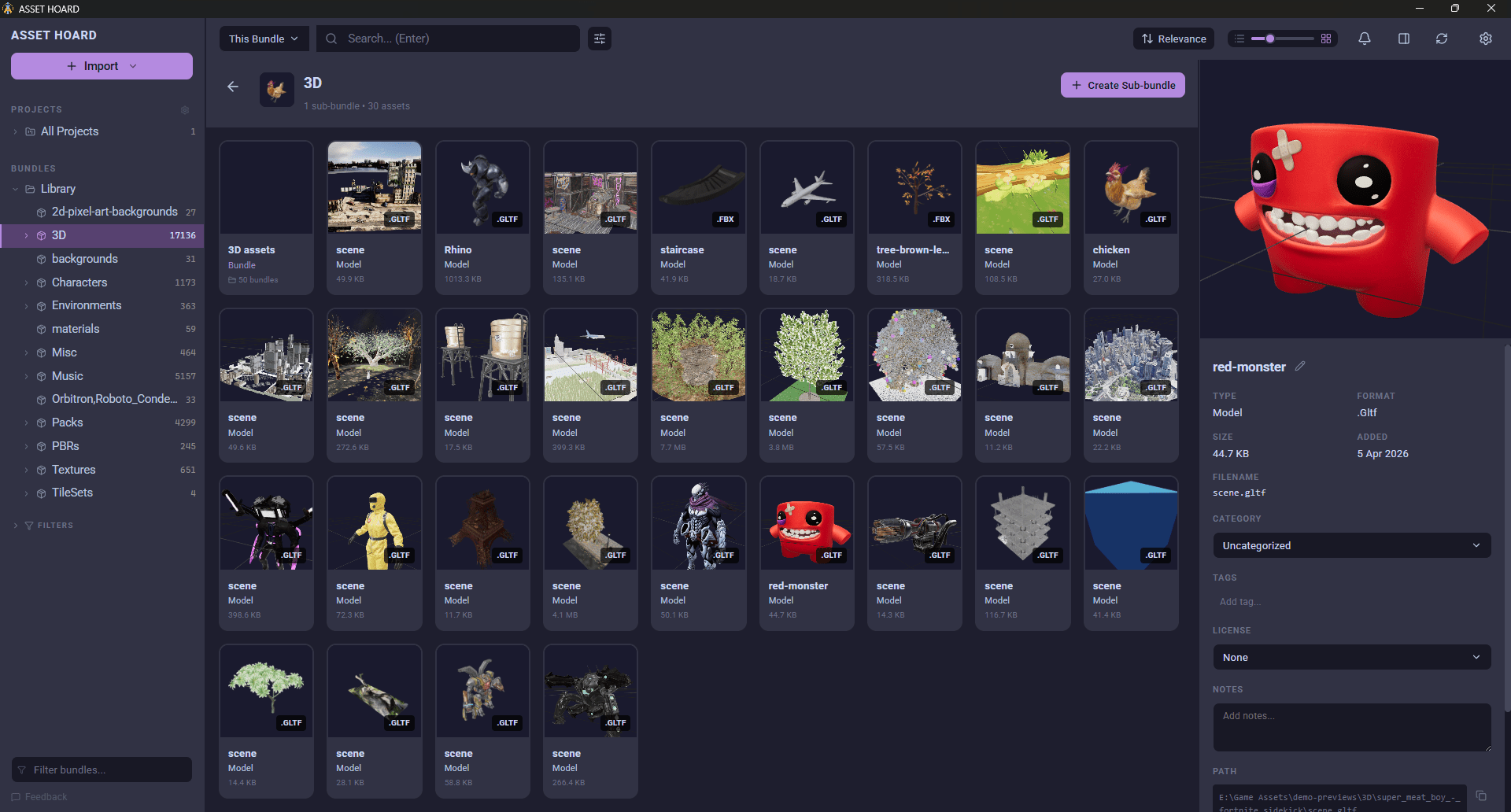
Auto-generated thumbnails
Every supported model gets a rendered thumbnail on import. A folder of FBX or glTF files is browsable on day one, without manually screenshotting each asset to find the one that fits.
Drag straight into your engine
Drag any model, texture, or material from AssetHoard into Unity, Godot, Blender, or anything else that accepts files. No copy-paste, no hunting through Explorer, no exporting to a working folder first. The library is the working folder.
Textures resolved automatically
3D models live or die by their textures. AssetHoard loads them the way each format expects, so the model in the preview matches the model in the engine.
- glTF and GLB use embedded buffers or relative paths, resolved automatically.
- FBX extracts embedded textures and resolves external references from nearby directories.
- OBJ with MTL reads the MTL file directly. OBJ without an MTL falls back to name matching.
- Blender (.blend) renders through the Blender command-line tool for accurate previews.
See the 3D documentation for the full format and texture matrix.
One library for every 3D project
A 3D artist or indie game developer rarely works on one project at a time. There is the game currently shipping, the prototype on the side, the Kitbash and Quixel packs collected over years, and the half-finished Blender scenes scattered across two drives. AssetHoard gives you one place to see all of it.
Import a folder of .fbx and .gltf files and every model becomes
rotatable in seconds. Drop in a Quixel megapack and the PBR texture sets group themselves.
Tag a prop with the project it belongs to, a kit with the biome it fits, a material with the
pipeline it targets. When the next project starts, the assets are already catalogued and
waiting.
Everything stays local. No cloud uploads, no project folders held hostage by someone else's server, no subscription to keep your own work accessible.
Supported 3D file formats
AssetHoard recognises the formats 3D artists and game developers actually ship.
.fbx.gltf.glb.obj.mtl.abc.blend.blend1.blend2
Frequently asked questions
Yes. AssetHoard renders FBX, glTF, GLB, OBJ, and Alembic (.abc) files in an interactive 3D viewer that runs entirely on the local machine. Maya, 3ds Max, and Blender do not need to be installed to browse a folder of models. Rotate, zoom, and pan every asset directly in the preview pane.
Yes. AssetHoard loads textures from glTF embedded buffers, FBX embedded media, and external files referenced by MTL or by name matching. PBR maps such as albedo, normal, roughness, metallic, and ambient occlusion are applied to the model in the preview, so the asset is rendered the way it will look in an engine rather than as untextured geometry.
Yes. AssetHoard previews Blender (.blend) files using the Blender command-line tool to extract a thumbnail and viewable mesh. Existing Blender scenes are browsable in the library without opening Blender for every file.
PBR texture sets are grouped automatically when textures share a base name and use standard suffixes such as _albedo, _normal, _roughness, _metallic, and _ao. The set is presented as a single entry in the library with a material preview, and the individual maps are still accessible. This keeps a Substance, Quixel, or AmbientCG export readable instead of cluttering the grid with twelve files per material.
Yes. Drag any FBX, glTF, OBJ, or other supported model from AssetHoard directly into the Unity Project window, the Godot FileSystem dock, the Blender viewport, or any application that accepts files. There is no copy-paste, no hunting through Explorer or Finder, and no export step.
Yes. On import, AssetHoard renders a thumbnail for every supported 3D model so the library is browsable visually from day one. Thumbnails respect the model orientation and apply textures where available, so a folder of FBX or glTF files becomes a recognisable grid instead of a wall of file icons.
Yes. AssetHoard supports custom tags so models, textures, and materials can be organised by project, biome, asset class, polycount budget, or any other taxonomy that fits the work. Tags work across the whole library, so a prop tagged once is searchable from any project that needs it.
AssetHoard is built for game development workflows. It provides interactive 3D previews for FBX, glTF, OBJ, Alembic, and Blender files, native PBR texture set grouping, .unitypackage and Godot .tres support, and drag-and-drop into Unity, Godot, and Blender. Connecter and Adobe Bridge are general-purpose asset browsers without dedicated game engine integration or Godot resource support.
Your whole 3D library, one view away
Local-first. No subscription. One-time purchase.