Every week someone asks whether AssetHoard can read format X, or talk to engine Y. Plenty of those we can't build into the app. The decoder is a huge C library under a licence we don't want to link, or the engine integration has to be written in another language. And if we built in every one we could, the app would bloat fast.
AssetHoard 0.3.1 adds plugins to handle those requests. The hard part was letting other people's code run inside the app without giving it access to your machine, so most of this post is about that.
The first two plugins
We started with two plugins that work in completely different ways.
HEIC: a new file format
HEIC is the format iPhones save photos in, and a lot of reference images arrive that way. The decoder, libheif, is a big C library. The plugin is libheif compiled to WebAssembly, wrapped in a small amount of JavaScript.
The plugin tells AssetHoard which extensions it handles and what kind of asset they become. Then it registers a hook that takes a file and returns raw pixels.
export async function activate(ctx) {
  ctx.registerFileHandler({
    decode(file) { /* -> { width, height, pixels } */ },
    describe(file) { /* cheap, header only -> metadata */ },
  });
}
AssetHoard handles everything after that in Rust. The plugin knows nothing about thumbnails, the large preview or Export As PNG. HEIC files work everywhere built-in formats do: folder import, watched folders, archives, bundle covers, reimport and export.
The plugin never sees a file path either. It gets a handle it can read from during one call, and it can't open anything else on your disk.
Godot: an editor bridge with no plugin code
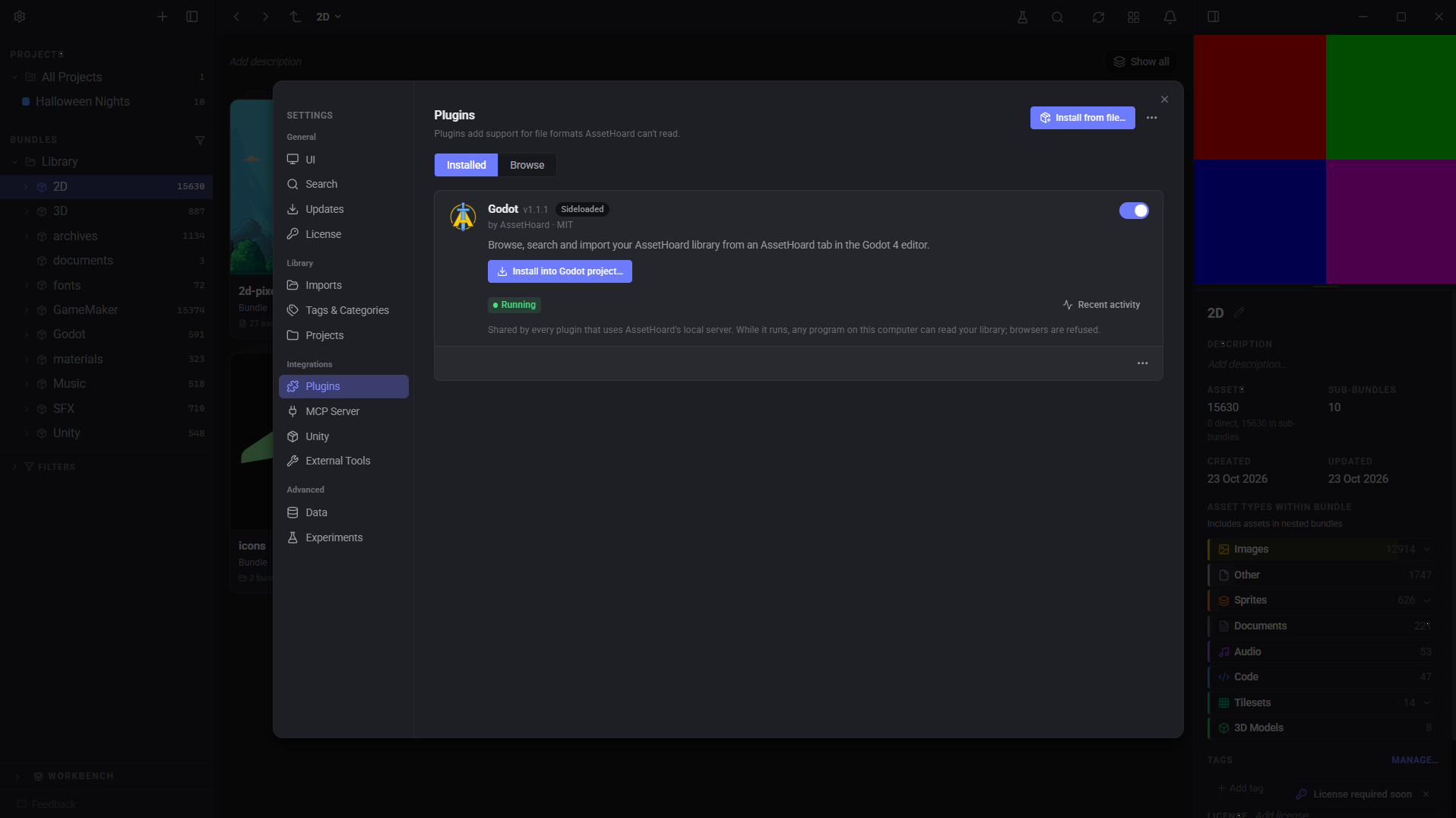
The Godot plugin has no JavaScript in it. It's a manifest, a Godot editor addon and one permission.
Install it, pick your Godot project, and an "AssetHoard" tab appears in the editor next to 2D, 3D and Script. You can browse bundles, search with the same filters as the app, and import into whichever folder you have selected in Godot.
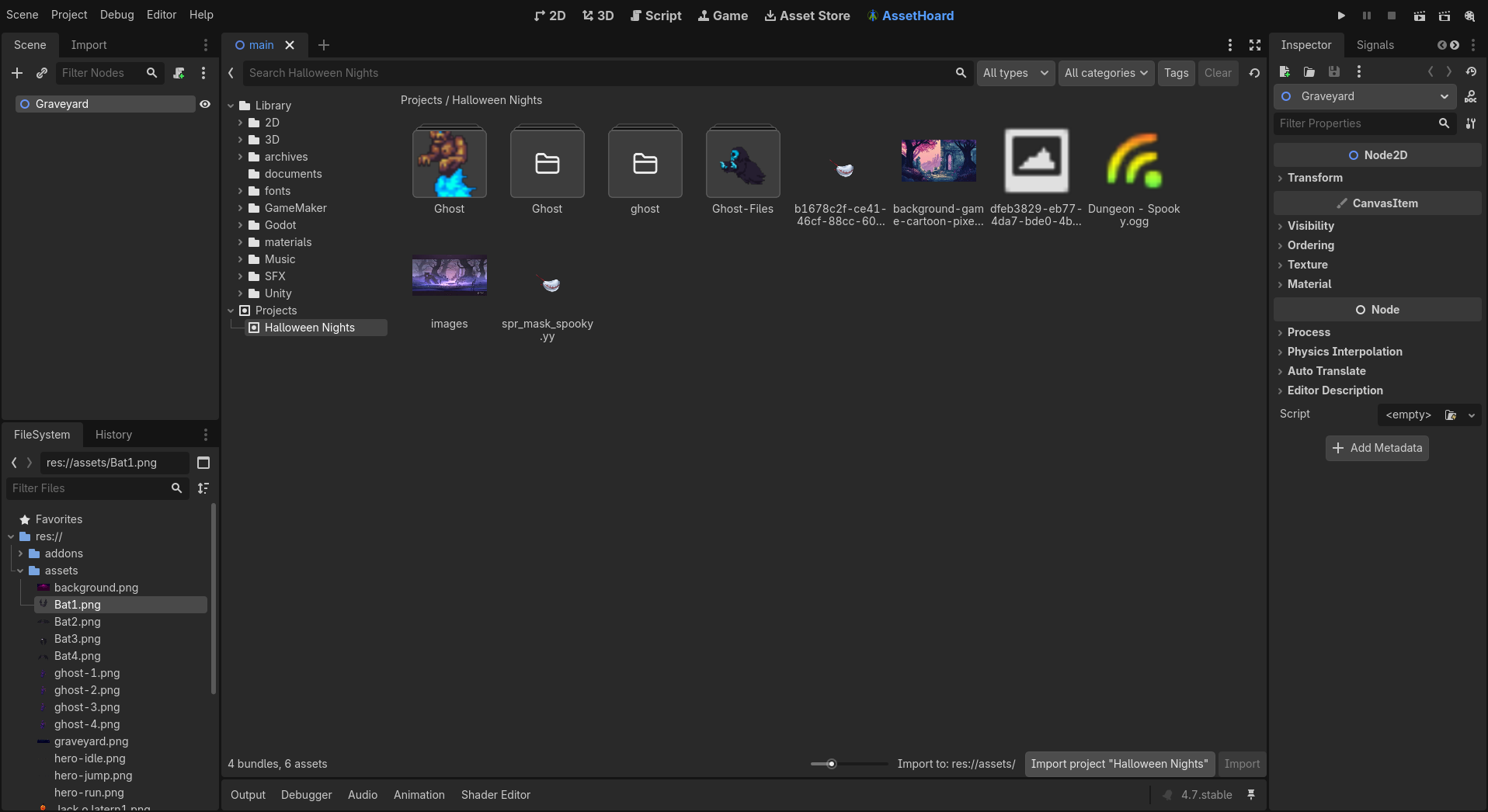
The permission tells AssetHoard to start a small local API, which AssetHoard runs itself. The plugin doesn't open any connections. AssetHoard also copies the addon into your project, after checking the folder is a Godot project. The plugin itself has no write access to anything.
Why an embedded V8, not Python or a subprocess
These are the options we ruled out:
| Option | Why not |
|---|---|
| Embedded Python | No real in-process sandbox, and native packages need builds for every platform |
| Python on WebAssembly | Loses native packages, so codecs like HEIC become impractical |
| Lua or QuickJS | No WebAssembly, so codecs can't be plugins |
| JavaScript embedded in the app via a webview | Every byte would pass between the UI and Rust, and we keep heavy data in Rust |
| A separate program per plugin | Builds for every platform, code-signing problems, and no sandbox by default |
We embedded V8, Chrome's JavaScript engine, through deno_core. That's the engine layer Deno is built on, without the rest of Deno. On its own it runs standard JavaScript and WebAssembly, and has no other abilities until we add them.
That gave us three things we needed:
- No access by default. A new engine instance can't touch files, the network or other processes.
- WebAssembly support. A C codec ships as a
.wasmfile inside the plugin. - One package for every platform. The same plugin runs on Windows, macOS and Linux, so authors don't need separate builds.
It adds a few megabytes to the installer, and a plugin starts in under 20 milliseconds. An installed plugin doesn't load until you import one of its files.
Permissions are doors we build
A plugin with no permissions can only read the file AssetHoard gives it, its own bundled files and its settings. HEIC needs nothing more, so it asks for no permissions.
Anything beyond that needs a permission. Each permission is a narrow, specific ability that AssetHoard implements and enforces. Take Godot. A general "write files" permission would have been simpler for us to build, but you'd be trusting the plugin with your whole disk. Instead you pick the folder, AssetHoard checks it, and AssetHoard copies only the files the plugin declared.
Only a couple of permissions exist today, and more are designed. Each one ships with tests that check a plugin without the permission gets an error.
A plugin can misbehave, the app shouldn't notice
We plan for two kinds of bad plugin: a buggy one that hangs, leaks memory or crashes, and a hostile one that tries to break out of the sandbox.
For the buggy kind, every plugin runs separately, with a time limit on each call and a memory cap. Runaway loops get stopped. A plugin that fails repeatedly is paused for a while. Plugins also run alongside the normal import pipeline, so a stuck plugin doesn't hold up built-in formats or other plugins.
A plugin failure also never fails your import. The file still comes in without a thumbnail, and right-click > Reimport adds it once the plugin is fixed.
For the hostile kind, the sandbox is the first line of defence, and we update V8 promptly when security fixes land. Registry downloads are signed and checksum verified. Submissions that ask for more permissions get a closer review. If a plugin turns out to be harmful, we can withdraw it and AssetHoard switches it off immediately.
Fewer prompts
If an app asks for permission too often, people stop reading and click yes. So AssetHoard asks once, in plain language, when you install.
- One prompt, at install. It lists what the plugin can do, which file types it reads, and anything it installs into another tool. There are no per-file or per-session prompts.
- Updates only flag what changed. If an update doesn't ask for anything new, you just confirm it.
- No restarts. Install, update, enable and disable all take effect immediately.
- Settings without code. A plugin lists its settings and AssetHoard builds the form.
- Warnings that match the risk. A plugin installed from a file gets a small tag. Plenty of game developers install plugins by hand or write their own, so we don't treat it as an emergency.
What's next
We built the plugin API so new kinds of plugin can be added the same way, each with its permissions designed before it ships.
On the list: more file formats, plugins that add actions to the right-click menu, and the one people ask about most, plugins that run after import, such as tagging new textures with an AI model running on your own machine. That one needs things the sandbox doesn't allow yet, so it'll take more work. We'll write about it when it's ready.
We're not giving dates for any of these. Whatever we add, plugins will still start with no access, and each new permission will be narrow, tested and explained at install.
Try it
Plugins are in AssetHoard 0.3.1. Open Settings > Plugins, browse the registry, and install HEIC or Godot. The plugins docs have the details. If you want to build your own, an SDK with TypeScript types, a scaffold and a test tool is on the way. Tell us what you'd build first. These two came straight from requests.
The AssetHoard Team
Frequently asked questions
There are two kinds so far. File handlers teach AssetHoard a new file format, so files like HEIC photos import with thumbnails, previews and export like any built-in type. Engine bridges connect AssetHoard to another tool, like the Godot plugin, which lets you browse and import from your library inside the Godot editor.
Plugins run in a sandbox with no access to your files, network or other programs by default. A plugin only gets extra abilities through narrow permissions that AssetHoard builds and enforces itself, and you see every permission in plain language before you install. Registry downloads are signature and checksum verified.
No. Each plugin runs separately with its own time and memory limits. If one hangs or crashes, your file still imports, just without a thumbnail, and Reimport fills it in once the plugin is fixed. Other plugins and built-in formats keep working.
Yes. Plugins are JavaScript modules, optionally with WebAssembly inside, and one package runs on Windows, macOS and Linux. An SDK with TypeScript types, a scaffold and a test tool is on the way. Until then the HEIC and Godot plugins are good starting points.