Godot plugin
Adds an AssetHoard tab to the Godot 4 editor. Search your library and import assets, bundles or whole projects, dependencies included.
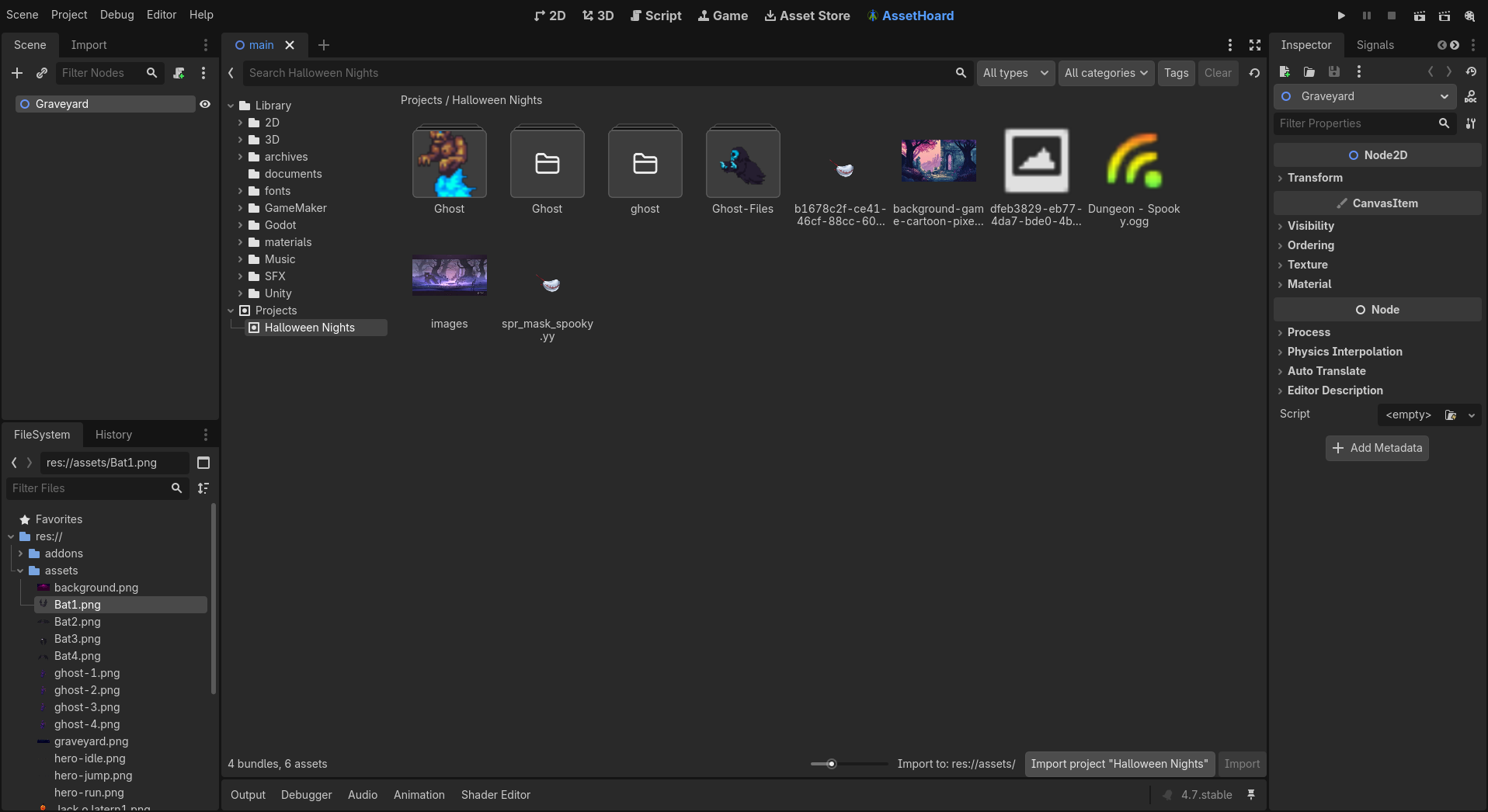
Switching between AssetHoard and Godot to find a file, then dragging it across, gets old fast. This plugin puts your library inside the editor. An AssetHoard tab sits next to 2D, 3D, Script and AssetLib, so you can search, browse bundles and import what you need without leaving Godot.
What it does
- An AssetHoard tab next to 2D, 3D, Script and AssetLib.
- Browse your bundles, or pick a project to see only the assets your game uses.
- Search as you type, and filter by file type, tag and category.
- Import selected assets, a whole bundle or a whole project into the folder selected in the FileSystem dock.
- Dependencies come along, and existing files are never overwritten.
- Right-click an asset to open it in AssetHoard.
- Finds AssetHoard by itself, even after a restart or a port change.
How to install
- In AssetHoard, open Settings > Plugins > Browse, find Godot and click Install.
- On the Godot card, click Install into Godot project… and pick your project folder.
- In Godot, switch the addon on under Project > Project Settings > Plugins.
- Open the AssetHoard tab. AssetHoard needs to be running.
Good to know
- Godot 4.2 or later only. Godot 3 is not supported.
- If AssetHoard isn't running, the tab asks you to start it and reconnects by itself.
- Change the default import folder (res://assethoard/) in Editor > Editor Settings > AssetHoard.
Frequently asked questions
Yes. The AssetHoard tab in Godot talks to the AssetHoard app on your computer. If AssetHoard isn't running, the tab asks you to start it and reconnects automatically.
It only accepts connections from programs on your own computer, refuses requests from web browsers, and needs a token that changes every time it starts. It only runs while a plugin that uses it, like Godot, is switched on.
Into the folder selected in the FileSystem dock, or res://assethoard/ if nothing is selected. You can change the default in Editor > Editor Settings > AssetHoard.
Godot 4.2 and later. It is tested on Godot 4.7. Godot 3 is not supported.
Other plugins

Get AssetHoard
A local-first asset manager that previews sprites, 3D models, audio and more, tracks the licence of every asset, and drags straight into Unity, Godot and Unreal. Free while in beta.