Plugins, missing files and audio export
AssetHoard is a local-first asset manager for game developers and digital artists. This release adds plugins, watched folders that follow renames and moves, a single screen for fixing missing files, filters beside the library, audio export, support for Spine and LightWave files, and faster launches on big libraries.
🧩 Plugins
Plugins are small add-ons that teach AssetHoard new file types and connect it to other tools, without waiting for an app update. Two are available now. See the plugins docs.
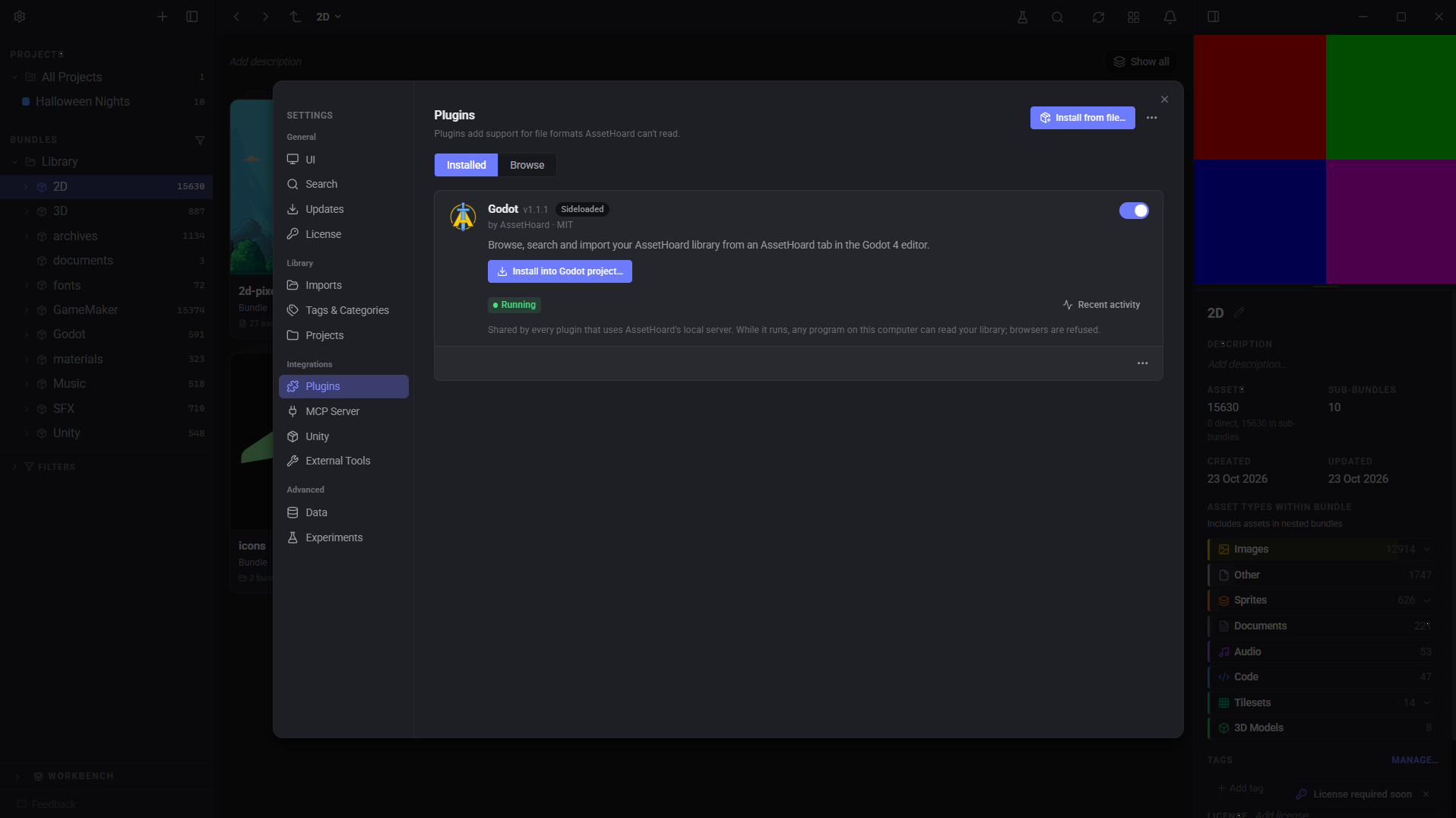
- HEIC. Your iPhone photos have a home.
.heic,.heifand.hiffiles import like any other texture, with thumbnails, a sharp large preview, Export As PNG, and details like camera model, date taken, bit depth and alpha. - Godot. Browse your AssetHoard library from inside the Godot editor. More below.
Whatever a plugin knows about a file shows up in the details panel.
- Installing. Install from the in-app registry, where downloads are signature and checksum verified, or double-click a
.assethoardpackage. Updates are flagged, including whether they ask for new permissions. - Settings > Plugins. Turn plugins on or off, change their settings, and choose which plugin handles a file extension when two support it. Built-in file handlers always take priority. Plugins write to their own
plugins.log. - Errors. Failed installs and updates are rolled back, crashed plugins are reported, and incompatible plugins are rejected at install.
Safe by design
Plugins run in a locked-down sandbox, and you decide what they can touch.
- You see what a plugin reads. The install prompt lists every file extension a plugin claims, and flags any an update adds. Plugins can't claim executables, keys, certificates, password stores or databases.
- You see what it installs. Files a plugin puts outside AssetHoard, like the Godot addon, are listed with their destination. If that folder already exists, AssetHoard asks before replacing it.
- No access to your disk. A plugin only gets the file it's working on and the files it ships with.
- No surprise permissions. Plugins can only ask for permissions AssetHoard actually uses (today, just the local HTTP server). New abilities in a later version mean a new prompt.
- It can't take AssetHoard down. Plugins have memory and metadata caps. After 3 failures in a row, AssetHoard pauses a plugin for 10 minutes and files still import without its extras. Switch it off and on to retry straight away.
- Your settings stay yours. Plugins can't change your render profile, sprite slicing, preview camera, backdrop or default previewers.
- Withdrawn plugins stay withdrawn. Plugins removed from the registry are turned off. If AssetHoard hasn't checked the registry in 14 days, Settings > Plugins says so, with a Check now button. Plugins keep working offline.
- Sideloaded plugins. A plugin folder you copy in by hand skips the install prompt, gets every permission it asks for and shows a Sideloaded badge. Only copy in plugins you trust.
Want to build your own? We're still stabilising the plugin API. Once it's settled, we'll publish an SDK and API docs.
🎮 Godot
The Godot plugin lets you search and use your AssetHoard library from inside the Godot editor. Click "Install into..." on the plugin's card, then switch it on in Godot under Project Settings > Plugins. AssetHoard checks for addon updates. See the Godot docs.
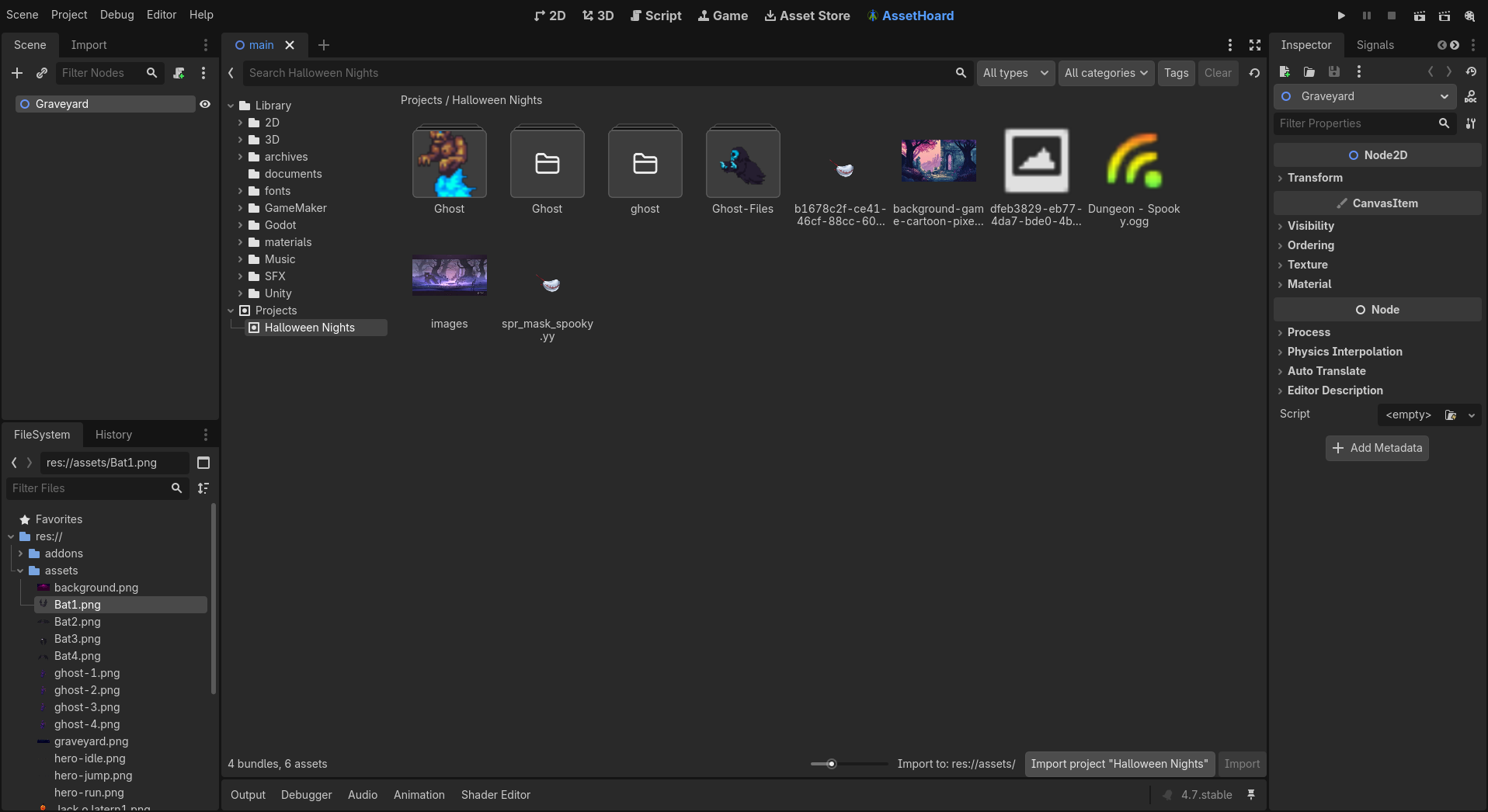
Search, browse bundles, tags, categories and projects, and copy assets into your project. Existing files are never overwritten. The plugin connects through a local API that only accepts requests from your machine and blocks browsers. It finds AssetHoard on its own, so changing the port or restarting AssetHoard needs nothing changed in Godot.
📂 Watched folders and missing files
- Renames and moves. Rename or move a file or folder, including case-only renames, and the asset keeps its tags, category, bundle and project links. This works for moves made while AssetHoard was closed, and for whole watched folders too. Mirrored bundles move with their folders.
- Disconnected drives. Assets on a disconnected drive or network share are paused, not marked missing. If the drive comes back under a different letter, AssetHoard picks it up.
- Deleted files. Files are marked missing after a short delay, so saving over a file doesn't trigger it. A watched folder you really deleted is flagged within 30 seconds instead of at next launch.
- One place to fix things. When your library needs attention, the bell shows a pinned "Your library needs a hand" row. It opens one screen listing broken watched folders, missing files and missing archives, sorted by what gets worse if you leave it. Unplugged drives don't count. They'll be back.
- Locate one, relink the lot. Search
is:missingto see every missing file alongside your usual filters. Locate one and AssetHoard offers to relink the rest of that folder in one go, with tags and bundles intact. One undo reverses the whole batch. - Deleted archives. Zips and packages whose file has been deleted show a badge and a clean-up button.
- Removed assets. Assets you remove from a watched folder stay removed through edits, rescans and renames. Undo or re-import to bring them back.
- Nested watched folders. The innermost watched folder owns its files. You'll see a preview with exact counts before anything moves.
- Renamed mirrored bundles still receive new files from their folder.
More in the watched folders docs.
🔁 Re-imports
- Re-importing a changed file updates the existing asset instead of adding a duplicate.
- Re-importing files already in your library tells you which bundle they're in, and the notification opens that bundle.
🎛 Filters
- Filters that fit your window. By default, filters sit below the bundles under 1290px wide, in a panel beside the library up to 1920px, and in two columns above that. Prefer them fixed? Pick Below or On Side under Settings > UI.
- Active filters stay visible. With the panel closed, active filters show as removable chips above the library, and the Filters button shows how many are on.
- More room. Sidebar filters have a draggable divider, so the bundle tree and filters stop fighting for space, and the filter panel can be resized.
🔊 Audio export
- WAV, OGG or MP3. Right-click a sound and pick Export As to convert it, including sounds inside a zip or Unity package. Image Export As now works inside archives too.
- MP3 export uses LAME. On Linux, install your distro's LAME package (
libmp3lame0orlame). - Settings > About now links to the open-source licences.
📦 New file types
- Spine.
.skeland.atlasfiles (Spine 3.6 to 4.3) now import as Sprites, with atlas thumbnails, skeleton details and a Spine filter. Previews are static for now. Reimport any Spine files you've already added. - LightWave.
.lwofiles now import as 3D models, with previews, thumbnails and turntables. LWO3 loads textures; LWO2 shows surface colours only for now. Legacy LWOB (LightWave 5 and earlier) isn't supported. Reimport any.lwofiles you've already added.
🗂 Drag bundles out
Drag a bundle from the sidebar or list view straight into Explorer and it lands as a folder with all its contents and subfolders. Let go before the copy finishes and nothing gets dragged.
⚡ Performance
- Search. Text search no longer waits for image search, and the search index is reused on launch instead of rebuilt.
- Image search. Progress is saved as it goes, so quitting partway through doesn't lose it.
- Launch. One-off upgrade jobs run once or in the background instead of on every launch.
- Imports. GameMaker
.yympspackages import much faster, and importing a loose folder of GameMaker, Godot or Unreal files no longer rescans your whole library for every file. Pixel-art detection runs after import, and is more accurate on images with transparency. - 3D previews. Textures are scaled down and shared textures load once, so large models open faster and use less memory.
🐛 Fixes
- Bundle covers you can see. Automatic covers now prefer images with thumbnails, then loose images, then audio. Audio packs no longer end up blank because a License.txt got picked. Blank automatic covers are fixed on next launch, and covers you set yourself are left alone. A folder containing only packages now gets a cover after import.
- New MCP
open_in_apptool opens an asset, bundle or project in AssetHoard. - Pixel-art thumbnails from watched folder imports are no longer squashed, and the grid refreshes when a watched import finishes.
- Revealing an asset or following a deep link now clears Type and Ecosystem filters, so the asset isn't hidden.
- Back and forward navigation is more reliable.
- The Settings sidebar is grouped into sections.
- AssetHoard now fingerprints local files in the background, groundwork for recognising files moved between drives. Cloud-only files are skipped, so nothing is downloaded just to be hashed.
- Crash logs are more complete, which helps if you ever send us one.
Happy hoarding.