← All Releases
Drag-in import, audio trimming, Blockbench models and your own themes
AssetHoard is a local-first asset manager for game developers and digital artists. Version 0.3.3 lets you drag files straight onto the window to import them, trim audio without leaving the app, preview Blockbench projects in 3D and build your own colour themes.
📥 Drag in to import
- Drop files and folders onto the window. Drag anything in from Explorer, Finder or your file manager and it goes through the same import flow as the Import button and the command palette.
- A single zip or package opens the import dialog, so you can set the category, tags and licence before it lands. Notifications for a lone package are named after the package, not "1 item".
- Several folders at once. Pick more than one folder in the import dialog and they import together. Each folder's own LICENSE file is detected for that folder (see licence detection), and notes you typed on import are no longer overwritten.
- Dragging something out of AssetHoard and letting go back over the window no longer imports it a second time.
✂️ Trim audio
- Trim a clip on its waveform. Open Trim audio from the audio preview (or press T, or right-click > Trim audio...), drag the selection and listen back.
- Export it or keep it. Export the trimmed clip, or save it as a new asset beside the source. It works for sounds inside zips and packs too.
- Trim silence moves the selection past the quiet bits at either end for you.
🧊 Blockbench models
- Your Blockbench projects, previewed. Blockbench files import as 3D models with a Blockbench badge, a textured grid thumbnail and a full 3D preview: orbit, zoom, lighting and the turntable, no export step. Textures render crisp, the way they look in Blockbench.
- Every format. Generic, Java Block/Item, Bedrock, Modded Entity, OptiFine and the rest, box UV or per-face UV, cubes and meshes. Details show the format, UV resolution and mapping alongside the usual counts.
- Animations play. Each animation in the project shows up in the preview's animation picker.
- Blockbench files already in your library are picked up as models on first launch. Reimport them to fill in thumbnails and details.
- A few limits for now: keyframes driven by Molang expressions hold still, smooth (bezier and Catmull-Rom) keys play linear, textures linked from outside the file aren't loaded, and compressed projects can't be previewed (re-save them uncompressed).
🎨 Your own themes
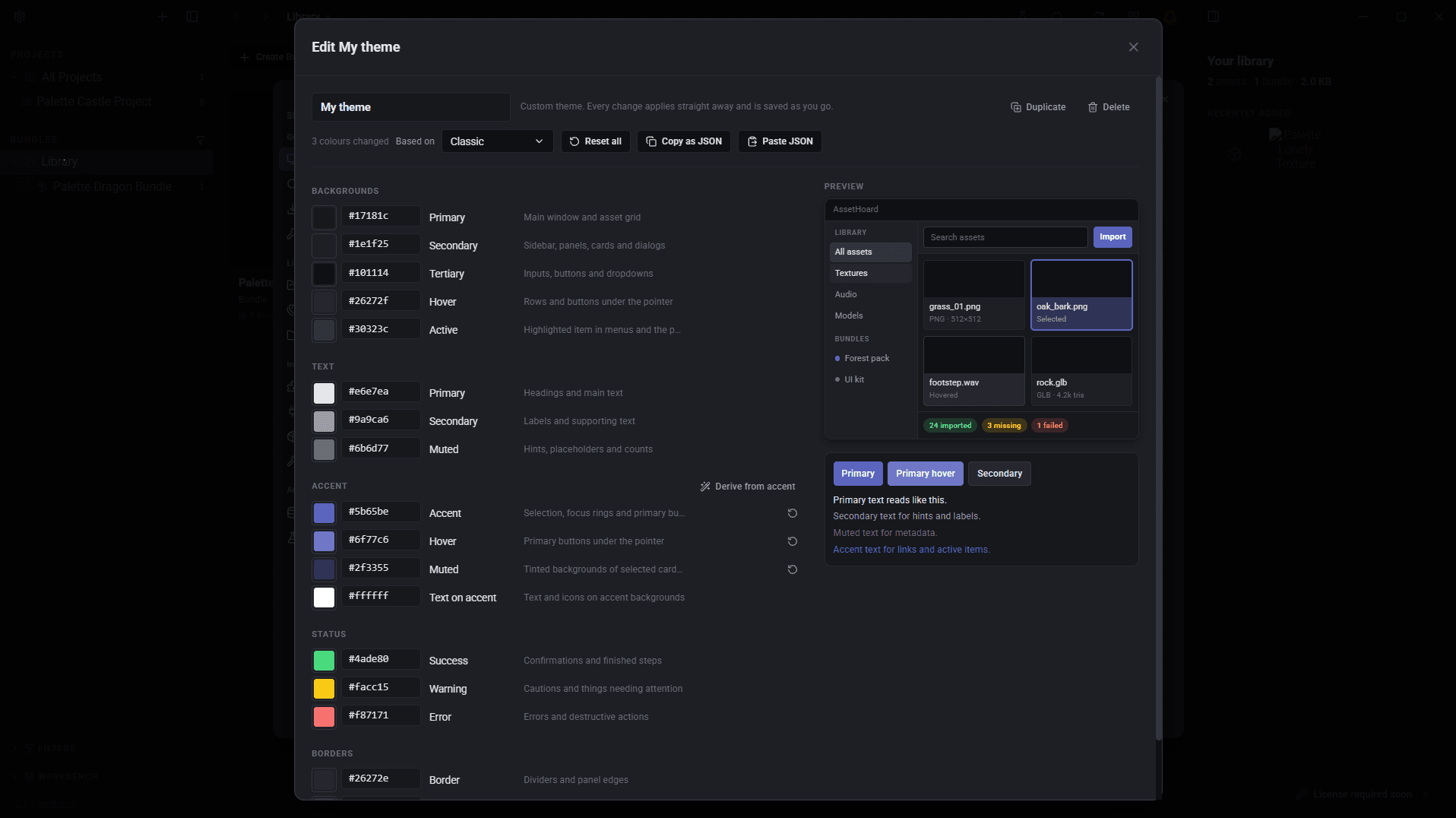
- Make a theme from the one you use now, give it a name and change its colours in the theme editor, with a live preview as you go.
- Rename, duplicate or delete your themes, and share them as JSON: copy one to send, paste in one a friend made. More in the themes docs.
📤 Export and drag
- Bundles of bundles drag out whole. Drag or export a bundle that holds other bundles and each sub-bundle keeps its folder, with Godot (
res://) and Unreal (/Game/) references laid out the way the engine expects. Let go before the files are ready and a toast tells you to hold the drag a moment longer. - Textures follow models into Godot. Dragging a
.tresnow brings the textures its models use, the same way export already did. - Shared textures written once. Exporting several models that share textures writes each texture once. If two models need different files under the same name, each model gets its own copy and a notice tells you which.
🐛 Fixes and polish
- Bundle covers you pick stay picked. A cover you set is kept apart from the automatic one, so imports and deletes never swap it out. If the asset behind your pick is deleted, the bundle falls back to the automatic cover.
- Better automatic covers. A bundle's automatic cover now prefers a model or material render over a plain texture, moves to a better asset when one arrives, and moves on when its asset is deleted.
- Edits stick. Changes made inside a bundle are still there when you leave and come back, and search results update in place when you edit an asset or bundle, through refreshes and "load more".
- Deleted tags are really gone. A deleted tag disappears everywhere and frees up its name, so making a new tag with the same name starts empty. Undo brings the old tag back with its assets.
- Tag picker keys. Enter picks the exact match, and Tab adds the tag and keeps the picker open for the next one.
- Cancelling an import keeps what's done. Files that finished importing before you hit cancel stay in your library, with undo intact, instead of being rolled back.
- A slow load no longer holds you on "Painting the pixels...". If part of your library is slow to load at launch, AssetHoard opens anyway, tells you some data is still loading and keeps trying in the background.
- Snappier window. Heavy previews, file reads and backups run in the background, so the window stays responsive while they work.
- Faster deletes on big libraries. Purging deleted assets used to take around two minutes per 5,000 assets on large libraries. It's now seconds.
- Launch with
--log verboseto write a detailed startup log for that run, handy if the app won't open and you can't reach Settings. It leaves your saved setting alone.
Happy hoarding.