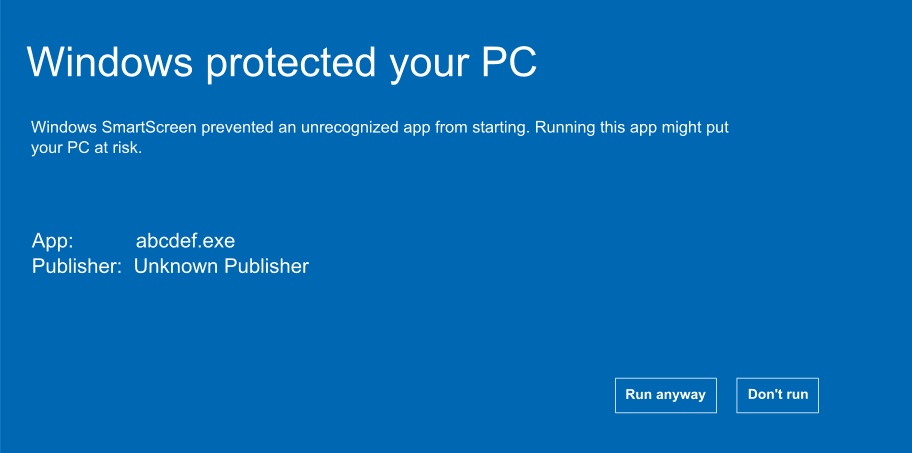
You put your game on itch.io or sell it from your own site. A player downloads the build, double-clicks it, and instead of your title screen gets a full blue panel: "Windows protected your PC", publisher unknown. A good number stop right there. It is one of the quietest ways a direct-download game bleeds installs: the player never tells you, they just leave. Here is what causes it and how to fix it.
Why does my game show the Windows protected your PC warning?
It comes from Microsoft Defender SmartScreen, a reputation system in Windows. Before running a downloaded file it checks whether the file is signed by a publisher it recognises and whether that exact file has been downloaded enough to look established. A new build from an unknown developer fails both, so Windows shows the warning. Your game is not flagged as malware, only as unknown, which to a cautious player is much the same thing.
Why Steam games are fine and yours is not
The warning only appears on files carrying the Mark of the Web, a tag Windows attaches to anything that arrived through a browser. Steam files never get it: the Steam client downloads, installs and launches the build itself, so nothing comes via a browser and SmartScreen never looks. That is how you can ship a completely unsigned game on Steam and no player sees a warning.
There is an instant fix, and it is not a certificate. It is a distribution channel. Anything that installs your build for the player sidesteps SmartScreen the way Steam does, and the Microsoft Store and the itch.io desktop app both qualify. If one fits your game, that is the fastest way out.
The catch is that most itch buyers just click the download in their browser. That file lands with the Mark of the Web attached and SmartScreen stops to inspect it. Same binary as the Steam version, only the delivery changed. Sell direct and sooner or later you deal with this.
What actually clears it
To sign a build you need a code signing certificate: a file that vouches the download came from you. The standard, affordable tier is an OV (organisation validation) certificate, and that is the one to get. Do not pay extra for the EV (extended validation) tier expecting the warning to vanish, it no longer bypasses SmartScreen, so OV does the same job for far less.
Reputation builds against two things: the file hash of each build, and your signing identity. So the routine is boring and repetitive:
- Sign every release with the same identity. Unsigned builds start from zero every version.
- Timestamp at signing, so the signature stays valid after the certificate expires.
- Do not touch the binary after signing. One changed byte breaks the signature.
- Keep the same certificate and publisher name. Switching resets the clock.
- Then ship clean builds and wait. Microsoft does not publish the threshold; expect several weeks and a few hundred clean installs.
Your earliest players see the warning regardless. Put a line on your itch.io page and in your Discord telling people to click "More info" then "Run anyway". Your first supporters will not mind. The ones worth shielding are the cold visitors on your store page with no reason to trust you yet.
So be clear about what signing buys: your name replaces "Unknown publisher", and the certificate is what reputation accrues to. An unsigned build banks nothing, starting from zero every release, so without one you never get on the ladder.
Which certificate should an indie developer buy?
Every code signing certificate now keeps its private key in FIPS-compliant hardware to curb theft: either a USB token posted to you, which must stay plugged in when you sign, or a cloud HSM run by the certificate authority, where the key stays on their hardware and you sign over an API.
| Option | Who it suits | Rough cost | Physical token | The catch |
|---|---|---|---|---|
| Microsoft Artifact Signing | US, Canada, EU, UK developers | about US$10 per month | No | Not available outside those countries |
| Certum Open Source | Genuinely free or open-source games only | ~US$55 to US$80 set, then ~US$35 per year | Yes (smartcard) | Revoked if used on a commercial release |
| SSL.com IV plus eSigner | Solo devs selling a paid game | from ~US$65 per year plus a cloud signing subscription | No (cloud HSM) | Subscription on top of the certificate |
| Sectigo or Comodo OV/IV | Mainstream cheapest commercial route | ~US$219 per year | Yes by default | Ships a USB token unless you use cloud signing |
| DigiCert OV/EV | Buyers whose contracts name DigiCert | ~US$400 OV, ~US$685 EV | Yes or cloud | Premium pricing, rarely justified for indies |
| EV, any authority | Kernel-mode driver signing | from ~US$287 per year | Yes (HSM) | No longer skips SmartScreen, organisations only |
For a solo developer selling a paid game the shortlist is short: a cloud-signed individual certificate from SSL.com, or an individual or organisation certificate with a token from Sectigo or Comodo. Individual validation is the least painful: it verifies you as a person, needs no registered company, and still puts your name on the build. None of them clear the warning on day one, whatever you spend.
What you have to prove to get one
Individual validation: a government-issued photo ID, sometimes proof of address, and usually a short live check where you scan your ID and record a brief video. Often issued within a day or two.
Organisation validation: proof the business exists (in Australia, your ABN and ASIC registration, or a letter from your accountant or lawyer), a publicly listed phone number for a callback, and an email on a domain you own. Usually one to seven business days.
Australian sole trader: validate as an individual with just your ID, or as a business with your ABN. The one door closed to you is Microsoft's Artifact Signing, which does not cover Australia.
The short version
Move to Steam, the Microsoft Store or the itch.io desktop app and the warning disappears at once. Stay on browser downloads and no certificate removes it on day one. Get one anyway so players see your name instead of "Unknown publisher", sign every build the same way, timestamp it, and let reputation build as real people install clean copies. It is slow and there is no shortcut. Sign consistently and wait it out.
Frequently asked questions
The warning comes from Microsoft Defender SmartScreen, a reputation system built into Windows. Before running a downloaded file it checks whether the file is signed by a publisher it recognises and whether that exact file has been downloaded enough times to look established. A new build from an unknown developer fails both checks, so Windows shows the warning. Your game is not being flagged as malware, only as unknown.
SmartScreen only inspects files carrying the Mark of the Web, a tag Windows attaches to anything downloaded through a browser. The Steam client downloads, installs and launches the build itself, so nothing arrives via a browser and SmartScreen never looks. When a player downloads your build directly from itch.io or your own site, the file gets the Mark of the Web and SmartScreen stops to inspect it, even though it is the same binary.
No, not any more. Microsoft changed how SmartScreen treats Extended Validation (EV) certificates, and its own documentation now states they no longer bypass the warning. A cheaper standard OV (organisation validation) certificate builds reputation the same way an EV one does, so paying the EV premium to skip SmartScreen buys you nothing. Any reseller promising an instant fix is quoting advice that expired around 2024.
Reputation builds against the file hash of each build and your signing identity, and Microsoft does not publish the threshold, so nobody can tell you an exact figure. In practice, expect several weeks and a few hundred clean installs of consistently signed builds before the warning lifts. Signing every release with the same certificate, timestamping it, and never altering the binary after signing all speed this along.
For a solo developer selling a paid game, the least painful route is individual validation: it verifies you as a person, needs no registered company, and still puts your name on the build. A cloud-signed individual certificate from SSL.com, or an individual or organisation certificate with a token from Sectigo or Comodo, all work. None of them make the warning disappear on day one, whatever you spend.
Yes, by changing how players get the build. Any channel that installs your game for the player sidesteps SmartScreen the way Steam does, and the Microsoft Store and the itch.io desktop app both qualify. If one of those fits your game it is the fastest way out, since nothing arrives through a browser and the warning never appears.