← All Releases
Godot .tres support, smarter multi-select
This release brings Godot resource files into Asset Hoard as proper, searchable, previewable assets. Multi-select gets a thorough polish across mixed asset and bundle selections, and a stack of smaller fixes round out the release.
🎮 Godot .tres support
Asset Hoard now understands Godot resource files. Materials, SpriteFrames and TileSets are first-class assets you can search, tag and preview directly, with no more hidden auto-bundles.
- Materials: StandardMaterial3D, ORMMaterial3D and SpatialMaterial render as a real PBR sphere with all texture references wired up.
- ShaderMaterials and
.gdshader: shader materials and shader source files now render as code with GLSL syntax highlighting instead of a meaningless default sphere. Opening aShaderMaterial.tresshows the linked.gdshadersource directly. - Procedural noise materials: materials that generate their textures via FastNoiseLite + Gradient (ice, lava, clouds, and the like) now render in the live preview and bake to thumbnails instead of showing a blank fallback.
- SpriteFrames: playable animation preview with autoplay, animation tabs, play/pause and 0.5×/1×/2× speed.
- TileSets: interactive zoom/pan tile preview with tile names, terrain tints, multi-atlas filtering, and a 4×4 library thumbnail. Works with Godot 3 and 4.
- Catchall for unknown
.tres: custom resources get the Godot mascot icon and a friendly "indexed but no preview" note. Single-texture resources thumbnail off that texture. - References panel: references are grouped into Imported / Not imported / Missing with click-through and a one-click "import now".
- Drag out with references: dragging a
.tresout also drops every referenced texture in theres://folder layout, so it works the moment you drop it into a Godot project.
For the full rundown, see the Godot asset manager page.
🖱 Multi-select polish
Selecting a mix of assets and bundles now behaves the way you'd expect.
- Selection summary panel: multi-select opens a summary with counts, shared tags, categories and licence, plus bulk actions (add to workbench, add to project, set licence, apply render profile). All undoable.
- Tag chips: solid chips for "all selected have it", dashed with count (for example,
indoor · 3/5) for partial. Works for assets, bundles and mixed selections. - Manage Tags / Categories: tri-state editor across the whole selection, bulk category set on assets, and bundle categories now actually edit all selected bundles instead of just one.
- Bulk operations on bundles: Move to Bundle, Add to Workbench and Remove from Bundle now work across multi-selections in a single undoable step.
- Mixed-selection actions: the context menu honours mixed asset and bundle selections, and one Ctrl+Z restores both halves of a mixed delete.
- Range select: Shift+click swings the range from the anchor (Explorer/Finder style) and works across the asset/bundle boundary.
🔊 Audio
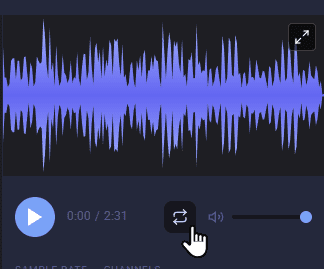
- Play from the thumbnail: cards and list rows now have a play control, and only one track plays at a time across views.
- Gapless preview loop: press the loop button (or R) in the expanded preview or details panel to repeat a track with no gap at the seam.
- Consistent waveforms: thumbnails, the inline preview and the expanded preview all render the same waveform now, so a track looks identical wherever you encounter it.
🔍 Search
Search now holds onto its context as you navigate.
- Filters survive back/forward: pressing back to a previous search restores the bundle scope and every other filter (file type, tags, sort) instead of falling through to a global query.
- Drill into bundles without dropping the search: double-clicking a bundle in search results opens it in place, with a "Search results > Bundle" breadcrumb to find your way around.
- One press back to the results: a single back returns you to the result list with all filters intact.
🐛 Fixes
- Right-click selection: right-click swaps to the clicked item instead of accumulating. Selections inside an existing multi-select are preserved.
- Search context menu: search context menus now show correctly.
- Wrong-extension imports: Asset Hoard now identifies file type from the file's contents rather than trusting the extension, so a GIF named
.ase(or any other mislabelled file) still imports correctly. - Rename to fix extension: when a file is named incorrectly (a JPG saved as
.png, for example), Asset Hoard offers a button to rename it. That button no longer flashes a misleading error after a successful rename. - Bundle contents no longer vanish during import: importing into a bundle you're currently viewing used to briefly wipe its existing contents from the grid while the library refreshed. Imports now slot the new assets in alongside the existing ones without rebuilding the view.
✨ Other
- Workbench starts minimised: first launch only. Existing users keep their preference.
- Faster imports for large libraries: the "Adding Assets" and thumbnail phases now scale with the size of the import, not the size of your existing library. The bigger your library, the bigger the saving. First launch after updating shows a brief library-optimisation notification while a new database index is built. Safe to quit and resume.
May your tilesets be tidy and your selections undoable.
Happy hoarding.