Unity Packages
Import, organise, and preview your Unity packages
Unity package support in AssetHoard is designed for browsing and organising your Asset Store library. It helps you remember what you own, tag packages by project or style, and find that asset you bought six months ago. When you're ready to actually use an asset, import the package into Unity as normal.
Automatic Cache Detection
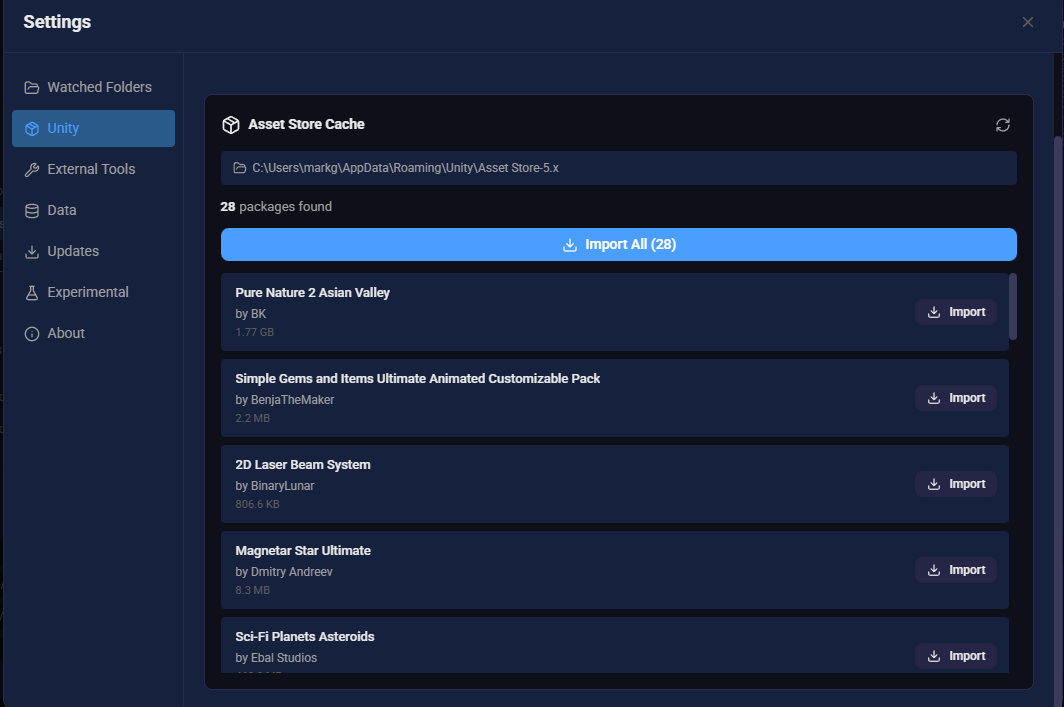
When you open Settings → Unity, AssetHoard automatically locates your Unity Asset Store download cache. If the folder exists, the path is displayed at the top of the section. If no cache is found, a message indicates that no Unity Asset Store cache was detected.
Cache Locations
| Platform | Path |
|---|---|
| Windows | %APPDATA%\Roaming\Unity\Asset Store-5.x |
| macOS | ~/Library/Unity/Asset Store-5.x |
| Linux | ~/.local/share/unity3d/Asset Store-5.x |
Scanning for Packages
AssetHoard uses a two-stage loading approach for speed:
- Instant cache load: Previously discovered packages are loaded from a local database cache, so results appear immediately when you open the settings tab
- Background filesystem scan: A scan of the Asset Store cache folder runs in
the background, walking the directory tree for any new
.unitypackagefiles. A progress indicator shows how many packages have been found so far
The publisher name and package name are parsed from the folder structure (the Asset Store cache
organises files as Publisher/PackageName/packagefile.unitypackage).
Newly discovered packages are highlighted with a NEW badge. You can re-scan at any time by clicking the Refresh button. Navigating away from the settings tab automatically cancels any in-progress scan.
Package List
After scanning, the Unity settings section displays a summary of total packages found, how many have already been imported, and how many are new since the last scan. Each package row shows:
- Package name and publisher
- File size
- Import status: either an Import button or an Imported badge
Importing Packages
There are two ways to bring Unity packages into AssetHoard, depending on where the package lives.
From the Unity settings tab
Use this for packages in your Asset Store download cache, which AssetHoard discovers automatically. From Settings → Unity, import packages individually or in bulk:
- Import (single): Click the Import button next to any unimported package
- Import All: Click the "Import All" button to import all unimported packages sequentially. A counter reports successes and failures when complete
With the standard file importer
Use this for .unitypackage files that live outside the Asset Store cache, such as
packs from Humble Bundle, itch.io, or a publisher's direct download. AssetHoard's standard
importer accepts them like any other asset:
- Drag and drop one or more
.unitypackagefiles, or a folder of them, straight into the app - Or use File → Import Assets from the menu and select the packages
Either way, AssetHoard unpacks the .unitypackage, indexes the assets inside, and
adds them to your library ready to browse, tag, and drag into Unity.
Supported Asset Types
Assets from Unity packages are categorised by file extension:
| Category | Extensions |
|---|---|
| Models / Prefabs | .prefab, .unity, .fbx, .obj, .blend, etc. |
| Textures / Images | .png, .jpg, .tga, .psd, .exr, .hdr, etc. |
| Materials & Shaders | .mat, .shader, .shadergraph, .compute, .cginc, etc. |
| Animations | .anim, .controller, .motion, .mask, .overrideController |
| Audio | .wav, .mp3, .ogg, .aiff, .audiomixer |
How AssetHoard parses package contents
AssetHoard reads the assets inside a .unitypackage and renders as much as it can
without opening Unity. What you see depends on the asset type:
- Thumbnails: AssetHoard uses the thumbnails Unity generated and stored in the package. Where none exist, it generates its own thumbnails for image files
- Materials: Unity supports several material types. AssetHoard renders the non-binary materials as PBR preview spheres
- Audio: The first time you open an audio file inside a package, AssetHoard generates its waveform
- 3D models: Models show a View in 3D option that loads the model in an interactive viewer
- Shaders and source code: Shader code and source code are viewable directly in AssetHoard
Not parsed yet
- Prefabs: Prefabs are listed and show their Unity thumbnail when one exists, but their contents are not parsed. Prefab parsing is on the roadmap
- Binary materials: Materials stored in Unity's binary format are not shown