← All Releases
Import everything
Asset Hoard v0.1.3 Release Notes
Import everything
This release introduces a completely rebuilt import system, Blender 3D integration, support for a wave of new file types, and significant performance gains across the board.
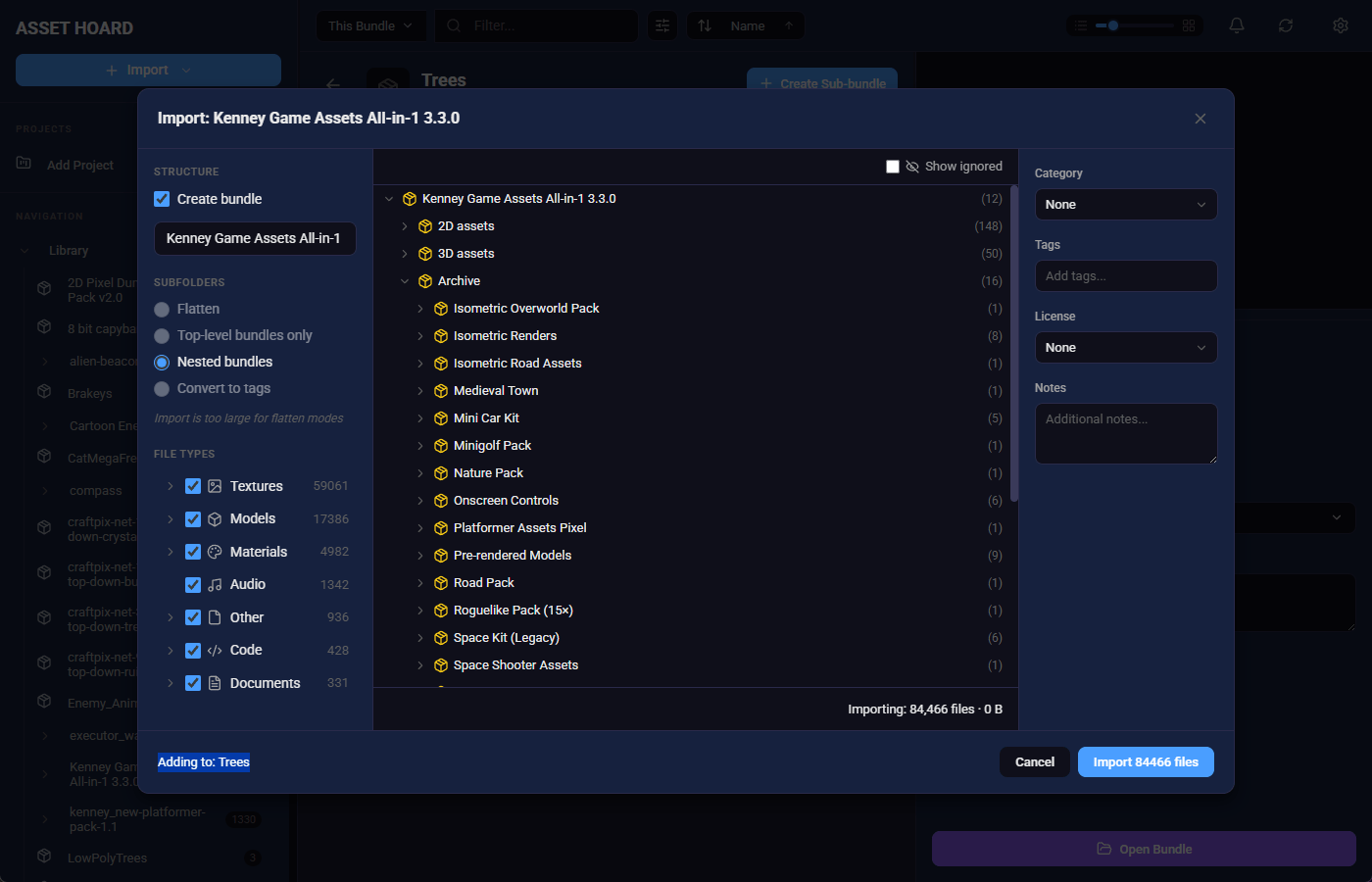
✨ Import System v2
A new importer experience is here, available behind a toggle in Settings → Experimental.
- Bundle preview — See what you're importing before you commit
- Progress tracking — Step-based progress tracking with live updates in the notifications section
- Cancellation support — Cancel imports mid-flight without leaving a mess
- Results dialog — Clear summary of what was imported when the job finishes, what didn't, and what you already have in your library
- "All Files" filter — New filter option with reorganised known file types in the import dialog
- FBX & GLTF — extended support for materials, textures and native extensions
📄 New File Type Support
- PDF — Metadata extraction, preview, and thumbnail support
- Documents —
.docx,.txt,.md,.otf,.rtf - Source code — Handler for code file types
- Unknown file types — Fallback handling with metadata extraction
- Audio — Waveform caching and generation on import, improved duration detection
🧊 Blender Integration
Blender 3D files are now supported if you have Blender installed.
- Auto-detection — Finds Blender installations via PATH, common install locations (Program Files, Steam, Snap, Flatpak), or manually
- Import support —
.blend,.blend1,.blend2files are importable as model assets - Fallback support — Simple Blender metadata extracted if Blender isn't available, with a link to the file
- Scene extraction — Extracts the scene, textures, and meshes using Blender CLI
- Interactive thumbnail — Interact with Blender models like any other 3D model in AssetHoard
- Animation support — Exports include animation data that are actively linked to objects
- Settings UI — Dedicated section showing detected version, path, with browse/redetect/auto-detect controls
📦 Bundle Improvements
- Cascading deletes — Deleting a bundle now always cascades to sub-items (removed "keep assets" option)
- Cycle detection — Prevents circular references during drag-and-drop
- Descendant safety check — Bundle descendant check for drag-and-drop safety
- Cumulative asset counts — Bundles now show cumulative asset counts
- Sticky header — Sticky bundle header with breadcrumb navigation and ancestry tracking
- Cover images — Bundle cover images shown in header, changeable on click
- Sub-bundle search — Searching in bundles now searches sub-bundles
- Drag to projects — Drag-and-drop bundles to projects in the sidebar
- Cover image fix — Fixed an issue where setting cover images quickly across multiple bundles would show the wrong bundle's assets
- Flatten Bundle — right click on a bundle to "flatten all sub-bundles" resulting in all assets sitting at the root
⚡ Performance & IPC Optimization
- ~40% faster imports — Significant improvement in import speed
- Faster filtering, thumbnails, previews, and navigation — Various speed improvements across the app
- 32% faster boot time — The app starts up noticeably quicker
- Large image support — Can now load 32k images with minimal memory footprint
🎨 UI/UX
- Smoother drag-and-drop — Reduced screen jankiness when dragging bundles
- Enhanced loading experience — Spinner with dynamic messages
- Search results view — Virtual scrolling with bundle info
- Refresh button — Added to the toolbar to refresh data in the app
🏗️ Build & Infra
- Arch Linux builds — Now available for Arch Linux users
🐛 Known Bugs
- Batch 3D thumbnail regeneration — Regenerating multiple 3D thumbnails fails with "no selected assets support thumbnail generation"; single asset generation works
- UI lock during image generation — Cover image and thumbnail generation can lock the UI
- Unity settings first load — The first time clicking on the "Unity" settings menu locks the UI while a file scan occurs
- Large material thumbnail freeze — The UI can sometimes freeze when generating thumbnails for large amounts of materials
May your assets be organised and your bundles be nested.
Happy hoarding!